Wednesday, 3 July 2013

File Export


File Export Pro For Android


File Export Pro For Android

File Expert Pro Requirements: 2.2 and up

Overview: File Expert is an ultimate app for managing your files on your mobile phones, tablets, personal computers and cloud storage servers.

 File Expert helps you easily share files with friends over Wi-Fi.

 File Expert currently supports 19 popular languages including English, Chinese, ArabicChinese, Korean, Russian, Japanese, Hebrew, Italian, Spanish, Portuguese, Hungarian, German, Turkish, Polish, French, Romanian, Arabic, Czech and Dutch.

Features:

 Access to your Gallery, Video, Music, E-Books, Documents, Apps, Plug-in, APK files, Zip Files, Favorites
Access to your Phone SD card, External SD card and Phone Internal Storage on your start page
Useful tools like Web PC Suite, Share My Contents, Network Clients, One Touch Clean, Theme Manager and more
Powerful File Manager- supports all basic file operations like Copy, Cut, Paste, Delete, Create, Sort, Rename, Send, Details, Favorites, Hide, Create Shortcut. Batch operation and more!
Search SD card, perform operations on search results
Web PC Suite- Featured HTTP Sharing in old versions. When open service, turn your mobile phone into a HTTP Server and visit it wirelessly on PC or tablet in a Windows style interface. Double click on APK file to install it to your phone
FTP Sharing - When open service, turn your mobile phone into a FTP Server. Share & manage your files on other FTP Clients
NFC Tapping & Wi-Fi Direct Support-You can use NFC or Wi-Fi Direct enabled phone to transfer files and apps. Long press on a file and choose Send Files.
Wi-Fi Send- Directly send files via Wi-Fi between File Expert powered phones. Long press on a file and choose Send Files.
DLNA Sharing - Turn your smart phone to a full-featured DLNA media server! Access your media files on your Windows Media Player became so easy!
Access your host computer from phone-Samba Client, FTP Client, SFTP Client, FTP Client, WEBDAV Client, Bluetooth Client
Root access to system folders and files like Root Explorer. Remount /system to read write. Requires rooted phone. Please note it’s a paid feature.
Cloud Storage - Use one app to access various cloud services! Support Google Drive, Dropbox, Box.net, SkyDrive, SugarSync, Ubuntu One and more!
Bluetooth - Full-featured Bluetooth capabilities include OBEX FTP, OPP
App Manager - Uninstall/Backup apps. Click to install apps. Support silent operations if on rooted devices
Archive manager - Create and decompress ZIP archive, Decompress RAR. You can view your ZIP/RAR/GZIP/TAR/TGZ/BZ file just like accessing a folder and directly decompress unique files and folders
Thumbnails - view thumbnails
Image Viewer - supports both local and remote folder
Powerful Text Editor
Help your player to play media that store on SMB share (your player needs to support HTTP streaming). FE is the ONLY file manager that can directly open some types of videos over SMB network
Theme support - Choose alternative themes that you love!
File Picker - Let FE to help you open files
Many other very useful features are waiting for you to discover!

 If you’d like to enjoy more exclusive features in File Expert please consider purchasing File Expert Pro Key Plugin in Google Play. Pro Key needs to work with File Expert.

Exclusive features included:
Root Explorer
Memory Manager
Safebox
Silent Install
Add Sent Files option in My Files/Quick Send/Received Files
Improve Spanish and French translation.
Fix a bug that sometimes it will crash when open network share


Machetesoft


MacheteSoft Machete 3.8 Registred Free Download


Machete is a quick and easy video editor. It is an ideal solution for simple "slicing" of your video files: you can delete unnecessary fragments (e.g. cut out commercials), copy, move, mix and save individual pieces. This means that Machete combines functionality of both a video splitter (cutter, trimmer) and a video joiner (for joining video files with the exactly the same formats) and more. Additional functions available: ability to extract and save video and audio streams as separate files, ability to add/replace audio stream in AVI, MP4, MOV, WMV and FLV files and ability to save a video frame as a bitmap (.bmp) file. You can also view and edit file tags (metadata) associated with any of the supported media formats.

Currently, Machete can edit AVI, WMV, MP4, MOV, WMA, MP3, WAV and FLV files (most video and audio codecs are supported: DV, DivX, XviD, H.264 (AVC), WMV, MSS, WMA, MP3, AC3, AAC and others). Support for more video formats will be added in future versions. The program's key feature is that editing of a video file is performed without re-encoding (so-called lossless editing). This not only saves time, but also prevents loss of video or audio quality. Also, it means that you would not need a powerful and expensive computer to edit your video material. After a file is edited and saved, it retains its original format.
The program does not require installation of any special codecs for multimedia editing in addition to regular decoders that are needed for video viewing and audio playback. You don't need any special skills or advanced knowledge to edit video with Machete.


R-studio


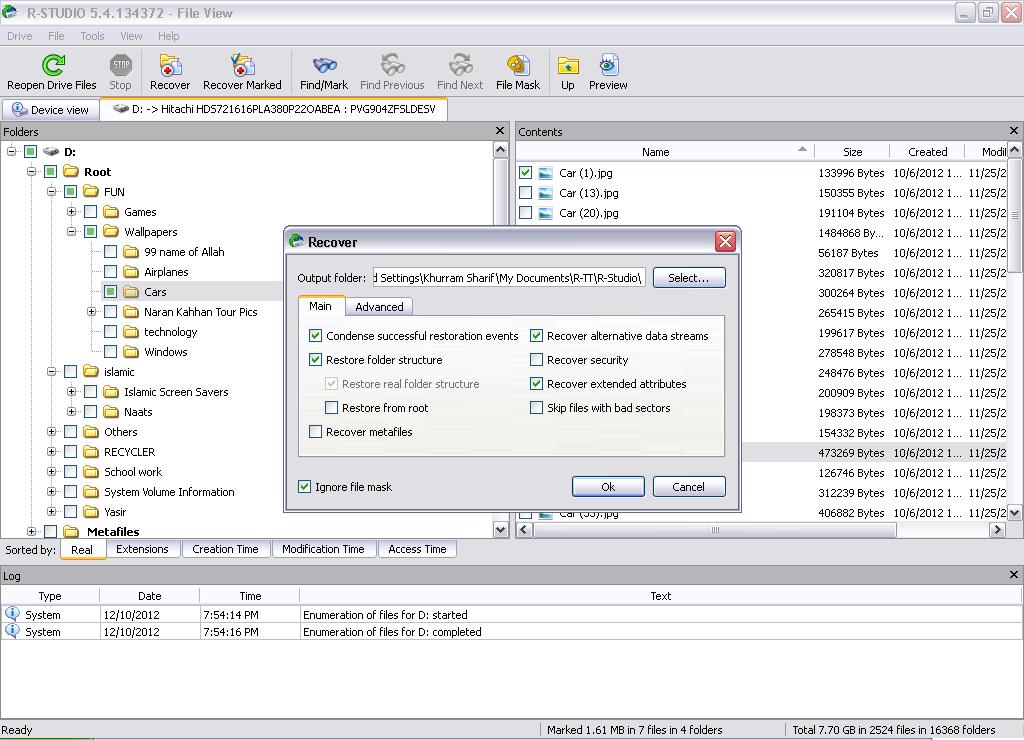
R-Studio 5.4 Build 13 Corporate Edition Registered (Data Recovery Software)


R-Studio can easily recover all known file types that have been deleted as long as the files have not been written over. The software is compatible with all Windows operating systems back to Windows 9x, and it can create disk images. R-Tools provides utilities for all types of recovery needs, from simple file deletion to network editions and technician editions of the software for difficult data-loss disasters.

R-Tools recovery software can recover lost files from any memory device, including hard disks, externally connected disks, memory cards, CDs and DVDs, floppy disks, USB-connected drives and more. It can even recover unknown file types if you create the parameters for the software to find them. The R-Studio version we reviewed runs on Windows PCs and can recover data from the same PC or connected devices and restore files to any memory device accessible by the host machine. However, the network version can run on any Windows-based PC and recover files from other types of machines and storage arrays via a network or internet connection.

The file recovery software can attempt to restore data after a variety of disk problems, including viruses, partition changes, reformatting, running of utility tools, or disks with bad sectors. It can even perform damaged RAID recovery by creating a virtual RAID from its components. The virtual RAID can process data like the original array. We tested this software's ability to discover and restore a group of files on three test PCs running Windows 7. This software was able to restore all our test files, and it even kept our deleted music album folder intact rather than splitting it into separate files.

R-Studio for Windows is as close as you can get to professional data recovery services in a do-it-yourself software solution. It can recover data lost due to all types of problems, from simple accidental file deletions to full system crashes and reformatted drives. Restoring mass quantities of data is complicated, but this software is multifaceted enough to handle complex situations. If you have a severely damaged disk, cannot start Windows or have partition issues, R-Studio is one of the best solutions available to help you restore your files and your peace of mind.

R-Studio 5.4 Build 13 Corporate Edition Registred          

R-Studio 5.4 Build 13 Corporate Edition Registred (64 bit) 

If It Doesn't work  then use the Software "I-Care Data Recovery ENTERPRISE v 4.3 Registered"
Given The link  Post link {I-Care Data Recovery ENTERPRISE v 4.3 Registred}